> ## Documentation Index
> Fetch the complete documentation index at: https://schaltwerk.mintlify.site/llms.txt
> Use this file to discover all available pages before exploring further.
# Keyboard Shortcuts
> Complete list of keyboard shortcuts for efficient session management
Schaltwerk is designed to be driven from the keyboard. All shortcuts are available system-wide.
For a visual overview of navigation shortcuts, see the [Keyboard Navigation](/guides/keyboard-navigation) guide.
## Quick Reference
| Shortcut | Action | Description |
| -------- | ------------------ | ----------------------------------------- |
| `⌘N` | Create Session | Start spec as running session |
| `⌘⇧N` | Create Spec | New markdown spec |
| `⌘⇧R` | Refine Spec | Open spec in orchestrator for refinement |
| `⌘R` | Mark Reviewed | Flag session as reviewed (optional) |
| `⌘⇧M` | Merge to Main | Merge running or reviewed session |
| `⌘⇧U` | Update from Parent | Pull parent branch and merge into session |
| `⌘⇧P` | Create PR | Create GitHub pull request |
| `⌘S` | Convert to Spec | Pause session, keep notes |
| `⌘D` | Cancel Session | Remove worktree |
| `⌘⇧D` | Force Cancel | Force cancel without confirmation |
| `⌘B` | Promote Version | Promote best session version |
| `⌘Y` | Reset Session | Reset session or orchestrator |
| `⌘P` | Switch Model | Open model selection dialog |
| Shortcut | Action | Description |
| -------- | --------------- | --------------------------------------------------------------------------------------------------- |
| `⌘1` | Orchestrator | Jump to orchestrator |
| `⌘2–9` | Sessions 2-9 | Jump to specific session |
| `⌘↑/↓` | Cycle Sessions | Navigate sessions in current filter (cycles agent selection when the Start New Model modal is open) |
| `⌘←/→` | Switch Filters | Switch between All/Specs/Running/Reviewed |
| `⌘⇧←/→` | Switch Projects | Jump between project tabs |
| `⌘G` | Git Diff | Open diff viewer for current session |
| `⌘⇧O` | Open in App | Open project/session in configured app |
| Shortcut | Action | Description |
| -------- | ---------------- | --------------------------------------------------------- |
| `⌘T` | Agent Terminal | Focus top terminal |
| `⌘/` | Shell Terminal | Focus bottom terminal |
| `⌘[` | Previous Tab | Switch to previous tab (agent or shell based on focus) |
| `⌘]` | Next Tab | Switch to next tab (agent or shell based on focus) |
| `⌘⇧A` | Add Tab | Add agent tab (top focused) or shell tab (bottom focused) |
| `⌘W` | Close Tab | Close the active tab in the focused terminal area |
| `⌘E` | Run Script | Execute configured command |
| `⌘Enter` | New Line | Insert new line in terminal |
| `⌘F` | Search | Open terminal search |
| `⌘⌃↑` | Scroll Line Up | Scroll terminal up one line |
| `⌘⌃↓` | Scroll Line Down | Scroll terminal down one line |
| `⌘⌥↑` | Scroll Page Up | Scroll terminal up one page |
| `⌘⌥↓` | Scroll Page Down | Scroll terminal down one page |
| `⌘⇧↑` | Scroll to Top | Scroll terminal to the very top |
| `⌘⇧↓` | Scroll to Bottom | Scroll terminal to the very bottom |
| Shortcut | Action | Description |
| -------- | -------------- | ------------------------------------- |
| `⌘Enter` | Finish Review | Complete diff review |
| `⌘Enter` | Submit Comment | Submit diff comment |
| `⌘F` | Search Diff | Open diff search |
| `⌘F` | Search History | Fuzzy-search commits (in History tab) |
| Shortcut | Action | Description |
| ------------ | ------------- | -------------------------- |
| `⌘+` / `⌘⇧=` | Increase Font | Increase font size |
| `⌘-` | Decrease Font | Decrease font size |
| `⌘0` | Reset Font | Reset font size to default |
## Common Workflows
1. Switch to Running filter with `⌘←/→`
2. Navigate sessions with `⌘↑/↓`
3. For each session:
* `⌘G` to open git diff viewer
* Add comments if needed
* `⌘Enter` twice to accept and paste comments
1. Switch to Reviewed filter with `⌘←/→`
2. Navigate sessions with `⌘↑/↓`
3. For each session:
* `⌘T` to focus agent terminal (prompt agent to run tests)
* OR `⌘/` to focus your terminal (test manually)
* Review results before merging
Use `⌘⇧←/→` to jump between project tabs (e.g., frontend ↔ backend)
Use `⌘1–9` for instant session switching instead of scrolling
## Customizing Shortcuts
All shortcuts can be customized in **Settings → Keyboard Shortcuts**:
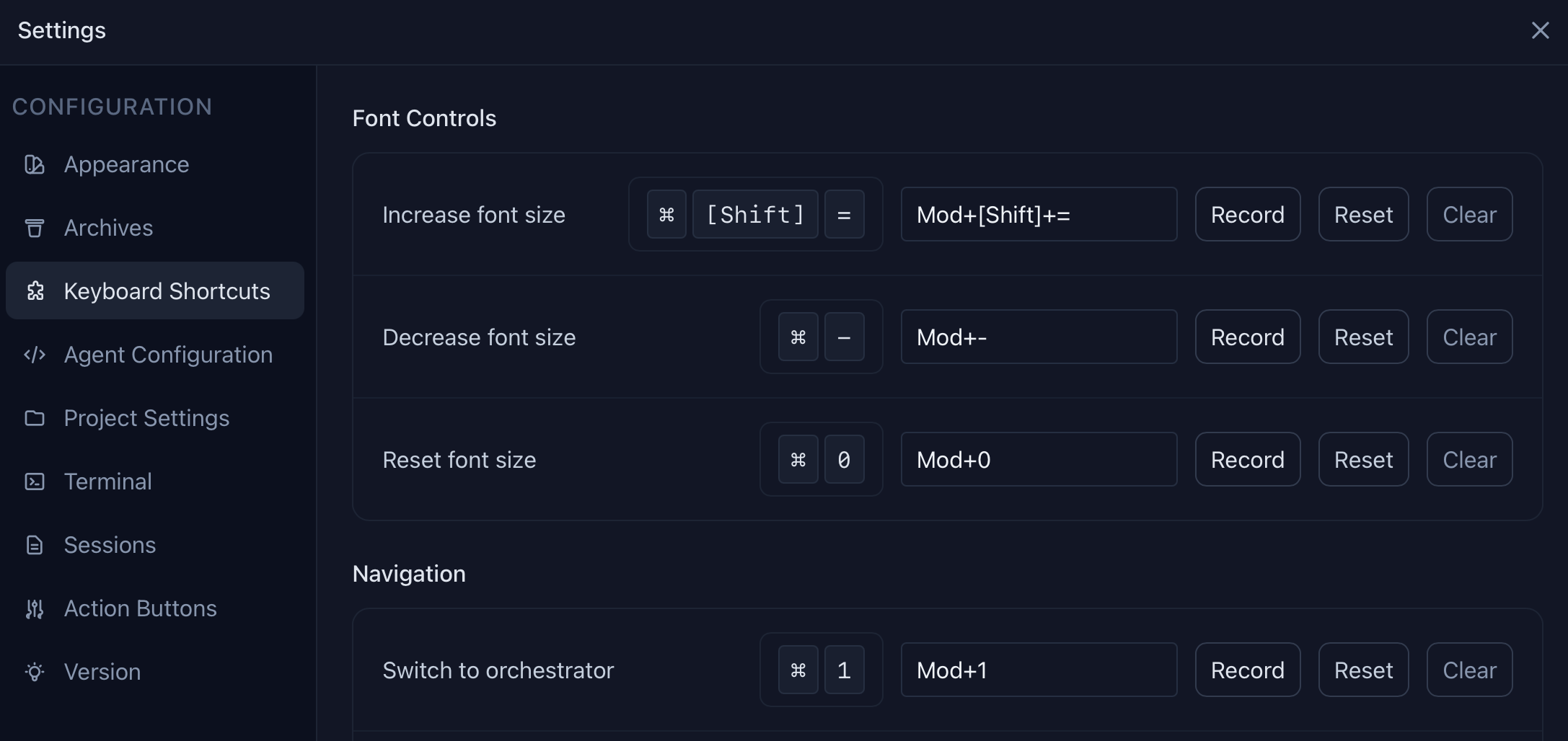 Click **Record** to capture a new key combination, **Reset** to restore defaults, or **Clear** to remove a binding.
## Notes
Some shortcuts may conflict with macOS system shortcuts. Check **System Settings → Keyboard → Keyboard Shortcuts** if they don't work as expected.
* Common conflicts: `⌘1–9` (app switching)
* Context-aware: Some shortcuts behave differently based on active context:
* `⌘Enter` and `⌘F` adapt to terminal vs diff viewer
* `⌘[` and `⌘]` switch agent tabs when focused on top terminal, shell tabs when focused on bottom terminal
* `⌘⇧A` adds an agent tab when top terminal is focused, or a shell tab when bottom is focused
* `⌘W` closes the active tab in whichever terminal area is focused (the last remaining tab cannot be closed)
Click **Record** to capture a new key combination, **Reset** to restore defaults, or **Clear** to remove a binding.
## Notes
Some shortcuts may conflict with macOS system shortcuts. Check **System Settings → Keyboard → Keyboard Shortcuts** if they don't work as expected.
* Common conflicts: `⌘1–9` (app switching)
* Context-aware: Some shortcuts behave differently based on active context:
* `⌘Enter` and `⌘F` adapt to terminal vs diff viewer
* `⌘[` and `⌘]` switch agent tabs when focused on top terminal, shell tabs when focused on bottom terminal
* `⌘⇧A` adds an agent tab when top terminal is focused, or a shell tab when bottom is focused
* `⌘W` closes the active tab in whichever terminal area is focused (the last remaining tab cannot be closed)