> ## Documentation Index
> Fetch the complete documentation index at: https://schaltwerk.mintlify.site/llms.txt
> Use this file to discover all available pages before exploring further.
# Pull Requests
> Create GitHub PRs from sessions, import PR context, and work with review comments
Schaltwerk integrates with GitHub (via the `gh` CLI) so you can:
* Start a session from an existing PR (imports description + conversation comments and checks out the PR branch)
* Create a GitHub PR from a running/reviewed session (`⌘⇧P`)
* Link sessions to PRs to fetch review comments and jump to GitHub quickly
## Setup GitHub Integration
On macOS:
```bash theme={null}
brew install gh
```
Schaltwerk can’t complete interactive login for you. Run this in your own terminal:
```bash theme={null}
gh auth login
```
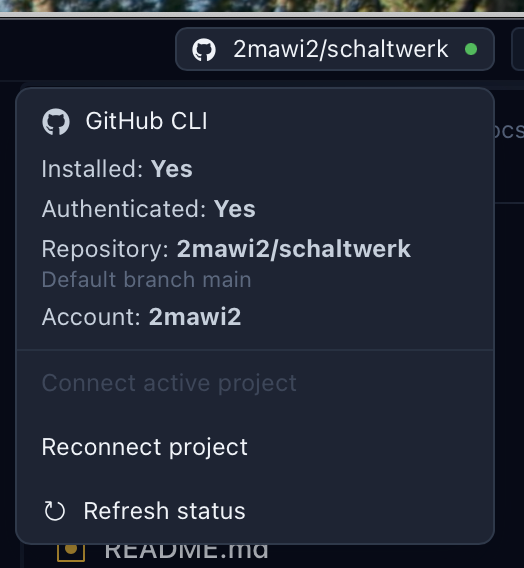
In **Settings → GitHub Integration**, connect the current project to a GitHub repository.
This stores the repo (`owner/name`) and default branch so PR automation knows where to target.
 PR automation uses `git push origin …` and `gh pr create`, so your repo needs a Git remote named `origin` and your GitHub account needs push access.
## Start a Session From a GitHub PR
Use this when you want an agent to work with real PR context (description + discussion), or to continue work on the PR branch.
PR automation uses `git push origin …` and `gh pr create`, so your repo needs a Git remote named `origin` and your GitHub account needs push access.
## Start a Session From a GitHub PR
Use this when you want an agent to work with real PR context (description + discussion), or to continue work on the PR branch.
 Press `⌘N` and choose **GitHub PR** as the prompt source.
Schaltwerk pulls:
* PR title, number, link, head branch, labels
* PR description
* PR conversation comments (the main discussion thread)
The session uses the PR’s head branch name and syncs with `origin` so you’re working on the same branch GitHub shows for the PR.
Review comments (inline comments attached to specific lines) are fetched separately via the **review comments** tools described below.
## Create a Pull Request From a Session
You can create PRs from both **Running** and **Reviewed** sessions.
Press `⌘⇧P` (or click the GitHub icon on the session card).
Adjust the strategy, title/body, base branch, and (optionally) a custom PR branch name.
Confirm with `⌘↵` or cancel with `Esc`.
### PR Strategy Options
* **Squash changes**
* Creates a single commit for the PR (includes uncommitted changes)
* Best when you want a clean, one-commit PR
* **Use existing commits**
* Keeps the session’s commit history intact
* If you have uncommitted changes, Schaltwerk adds one extra commit for them on the PR branch
### Default Title, Body, and Base Branch
When the dialog opens, Schaltwerk pre-fills:
* **PR title**
* If the session has exactly one commit: uses that commit summary
* Otherwise: uses a title derived from the session name
* **PR description**
* If the session has commits: a bullet list of commit summaries
* Otherwise: the session’s initial prompt text
* **Base branch**
* Defaults to the session parent branch (override any time)
### Custom PR Branch Name
By default, Schaltwerk uses the session branch as the PR head branch. Enable **Use custom PR branch name** to push the PR to a different branch instead (useful for avoiding conflicts or keeping the session branch untouched).
### Auto-Cancel After PR
Enable **Auto-cancel after PR** to automatically cancel the session after the PR is created (worktree cleanup).
Cancellation removes the session worktree and is destructive. Only enable auto-cancel if you’re confident you won’t need the local session worktree anymore.
## Branch Conflicts and Guardrails
Schaltwerk blocks PR creation in a few common “this will likely fail” cases:
* **Branch conflict detected**
* The remote branch already exists with different commits (non-fast-forward).
* Fix by choosing a custom PR branch name (or resolve the remote branch conflict manually).
* **Cannot squash pushed branch**
* If the branch already exists on the remote, squashing would rewrite history and `git push` will be rejected.
* Fix by switching to **Use existing commits** or choosing a custom PR branch name.
* **Uncommitted changes conflict with pushed branch**
* If the branch is already on the remote and your worktree is dirty, Schaltwerk requires you to either commit/push first or use a custom PR branch name.
## Link a Session to a PR (and Unlink)
Linked PRs show up on session/diff actions and unlock review-comment tooling.
Open the session diff view and click **Link PR**, then search/select a PR from the connected repository.
If a session is linked to the wrong PR, unlink it from the same header actions.
Sessions created from a GitHub PR prompt are already linked to that PR automatically.
## Fetch PR Review Comments
When a session is linked to a PR, Schaltwerk can fetch GitHub **review comments** (inline comments on files/lines):
* **Send to terminal** from the diff header actions (great for “fix these review comments” loops)
* **Copy to clipboard** from the Reviewed session actions (quickly paste into a spec, Slack, or an external tool)
Schaltwerk groups comments by file, preserves line locations when available, and includes replies in the thread.
## MCP: Let an Agent Open the PR Modal
If you have MCP enabled, agents can request that Schaltwerk open the PR modal for a session:
* Tool: `schaltwerk_create_pr`
* Behavior: triggers the **Create Pull Request** modal in the UI with suggested values
* Important: the tool **does not create the PR** by itself — you review/edit and confirm in the modal
Example tool input:
```json theme={null}
{
"session_name": "my-session",
"pr_title": "Fix auth redirect on logout",
"pr_body": "Summary…",
"base_branch": "main",
"pr_branch_name": "pr/my-session",
"mode": "squash"
}
```
Press `⌘N` and choose **GitHub PR** as the prompt source.
Schaltwerk pulls:
* PR title, number, link, head branch, labels
* PR description
* PR conversation comments (the main discussion thread)
The session uses the PR’s head branch name and syncs with `origin` so you’re working on the same branch GitHub shows for the PR.
Review comments (inline comments attached to specific lines) are fetched separately via the **review comments** tools described below.
## Create a Pull Request From a Session
You can create PRs from both **Running** and **Reviewed** sessions.
Press `⌘⇧P` (or click the GitHub icon on the session card).
Adjust the strategy, title/body, base branch, and (optionally) a custom PR branch name.
Confirm with `⌘↵` or cancel with `Esc`.
### PR Strategy Options
* **Squash changes**
* Creates a single commit for the PR (includes uncommitted changes)
* Best when you want a clean, one-commit PR
* **Use existing commits**
* Keeps the session’s commit history intact
* If you have uncommitted changes, Schaltwerk adds one extra commit for them on the PR branch
### Default Title, Body, and Base Branch
When the dialog opens, Schaltwerk pre-fills:
* **PR title**
* If the session has exactly one commit: uses that commit summary
* Otherwise: uses a title derived from the session name
* **PR description**
* If the session has commits: a bullet list of commit summaries
* Otherwise: the session’s initial prompt text
* **Base branch**
* Defaults to the session parent branch (override any time)
### Custom PR Branch Name
By default, Schaltwerk uses the session branch as the PR head branch. Enable **Use custom PR branch name** to push the PR to a different branch instead (useful for avoiding conflicts or keeping the session branch untouched).
### Auto-Cancel After PR
Enable **Auto-cancel after PR** to automatically cancel the session after the PR is created (worktree cleanup).
Cancellation removes the session worktree and is destructive. Only enable auto-cancel if you’re confident you won’t need the local session worktree anymore.
## Branch Conflicts and Guardrails
Schaltwerk blocks PR creation in a few common “this will likely fail” cases:
* **Branch conflict detected**
* The remote branch already exists with different commits (non-fast-forward).
* Fix by choosing a custom PR branch name (or resolve the remote branch conflict manually).
* **Cannot squash pushed branch**
* If the branch already exists on the remote, squashing would rewrite history and `git push` will be rejected.
* Fix by switching to **Use existing commits** or choosing a custom PR branch name.
* **Uncommitted changes conflict with pushed branch**
* If the branch is already on the remote and your worktree is dirty, Schaltwerk requires you to either commit/push first or use a custom PR branch name.
## Link a Session to a PR (and Unlink)
Linked PRs show up on session/diff actions and unlock review-comment tooling.
Open the session diff view and click **Link PR**, then search/select a PR from the connected repository.
If a session is linked to the wrong PR, unlink it from the same header actions.
Sessions created from a GitHub PR prompt are already linked to that PR automatically.
## Fetch PR Review Comments
When a session is linked to a PR, Schaltwerk can fetch GitHub **review comments** (inline comments on files/lines):
* **Send to terminal** from the diff header actions (great for “fix these review comments” loops)
* **Copy to clipboard** from the Reviewed session actions (quickly paste into a spec, Slack, or an external tool)
Schaltwerk groups comments by file, preserves line locations when available, and includes replies in the thread.
## MCP: Let an Agent Open the PR Modal
If you have MCP enabled, agents can request that Schaltwerk open the PR modal for a session:
* Tool: `schaltwerk_create_pr`
* Behavior: triggers the **Create Pull Request** modal in the UI with suggested values
* Important: the tool **does not create the PR** by itself — you review/edit and confirm in the modal
Example tool input:
```json theme={null}
{
"session_name": "my-session",
"pr_title": "Fix auth redirect on logout",
"pr_body": "Summary…",
"base_branch": "main",
"pr_branch_name": "pr/my-session",
"mode": "squash"
}
```