

Sessions
What is a Session?
Every running session is a dedicated git worktree branching from your repository. Two terminals come with each session so agents and humans can work side-by-side.
Isolated Worktrees
Each session gets its own git worktree and branch
Dual Terminals
Top terminal for the agent, bottom terminal for manual commands
Instant Switching
Switch between sessions instantly—terminals stay alive in the background
Sidebar Organization
Sessions appear in the left sidebar under Agents
Renaming Sessions
Double-click on a session name in the sidebar to rename it. The git branch will be updated to match the new name.Session Filters
Use the tabs at the top of the session list to filter what you see:- All
- Specs
- Running
- Reviewed
Shows all sessions regardless of state
Specs

Markdown Planning
Specs are markdown documents that live in the orchestrator
Capture Intent
Capture the desired outcome before any code is written
Agent Prompts
When started, the spec becomes the agent’s first prompt
Amber Badge
Specs carry an amber badge until you start them
Think of specs as reusable backlog cards. Start them when you’re ready, and if a session isn’t working out, press
⌘S to discard the worktree, keep the spec intact, and retry later with new instructions.Spec Lifecycle
1
Draft the spec
Write a markdown document describing the desired outcome
2
Start the session
Convert the spec into a running session with worktree and terminals
3
Agent receives prompt
The spec content becomes the agent’s initial instructions
Orchestrator
The Control Panel
The orchestrator runs directly on your primary branch—typically
main, but it can be a long-lived feature branch too—giving you a stable workspace for planning and coordination.Orchestrator Features
Spec Creation
Spec Creation
Draft multiple specs before launching sessions. Perfect for planning parallel work streams.
MCP REST API
MCP REST API
The orchestrator powers automation through the MCP REST API, enabling external tools to create and manage sessions.
Dual Terminals
Dual Terminals
Like regular sessions, the orchestrator has an agent terminal on top and your shell below.
Accessing the Orchestrator
Session States
Spec
Drafting the work. No worktree yet.
- Markdown document in the orchestrator
- Amber badge in sidebar
- Can be edited or deleted without affecting git
Running
Active session. The session owns a worktree and active terminals.
- Git worktree created under
.schaltwerk/worktrees/ - Two PTY terminals spawned
- Agent process can run in top terminal
- Magenta badge in sidebar
Reviewed
Ready for merge. The worktree is ready for integration.
- Code has been tested locally
- Green badge in sidebar
- Can still make manual edits in worktree
- Integration options:
⌘⇧M- Direct merge to main⌘⇧P- Create GitHub pull request
State Transitions
Transitions are explicit and user-controlled. The app never automatically changes session states.
- Spec → Running
- Running → Reviewed
- Running → Spec
Keyboard:
⌘NAction: Start AgentResult: Creates worktree, branch, and terminalsLifecycle Scenarios
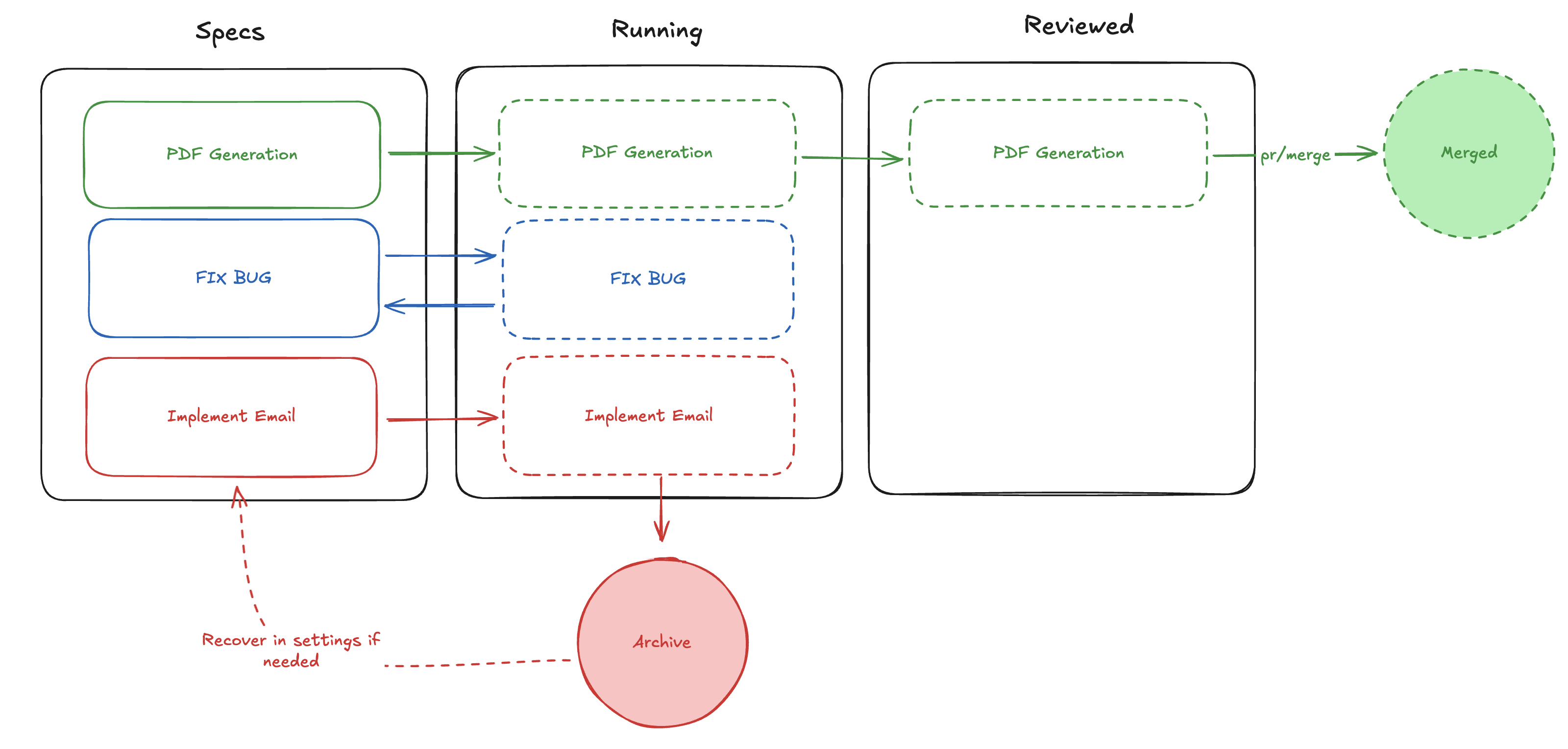
1
Ship it (green)
PDF Generation represents the happy path: draft the spec, run the session, review the work, then merge via PR or
⌘⇧M.2
Retry later (blue)
Fix Bug shows how to convert a running session back into a spec when the change is deferred—the worktree and session branch are deleted (uncommitted work is lost) but the plan stays in the backlog for another attempt.
3
Archive experiments (red)
Implement Email demonstrates cancelling a session you no longer need. The worktree is removed and the session moves to the archive, which you can recover from Settings → Archive if you change your mind.
Next: Worktrees & Terminals