
gh CLI) so you can:
- Start a session from an existing PR (imports description + conversation comments and checks out the PR branch)
- Create a GitHub PR from a running/reviewed session (
⌘⇧P) - Link sessions to PRs to fetch review comments and jump to GitHub quickly
Setup GitHub Integration
1
Install GitHub CLI (`gh`)
On macOS:
2
Authenticate `gh` in your terminal
Schaltwerk can’t complete interactive login for you. Run this in your own terminal:
3
Connect the project in Schaltwerk
In Settings → GitHub Integration, connect the current project to a GitHub repository.This stores the repo (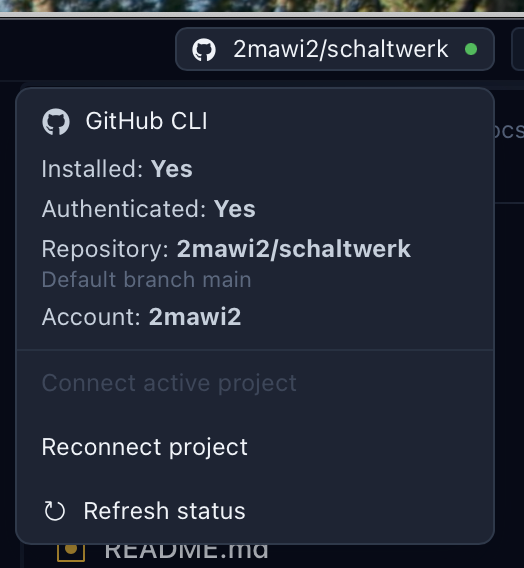
owner/name) and default branch so PR automation knows where to target.PR automation uses
git push origin … and gh pr create, so your repo needs a Git remote named origin and your GitHub account needs push access.Start a Session From a GitHub PR
Use this when you want an agent to work with real PR context (description + discussion), or to continue work on the PR branch.
1
Open New Session
Press
⌘N and choose GitHub PR as the prompt source.2
Search and select the PR
Schaltwerk pulls:
- PR title, number, link, head branch, labels
- PR description
- PR conversation comments (the main discussion thread)
3
Session starts on the PR branch
The session uses the PR’s head branch name and syncs with
origin so you’re working on the same branch GitHub shows for the PR.Review comments (inline comments attached to specific lines) are fetched separately via the review comments tools described below.
Create a Pull Request From a Session
You can create PRs from both Running and Reviewed sessions.1
Open the PR dialog
Press
⌘⇧P (or click the GitHub icon on the session card).2
Review options and confirm
Adjust the strategy, title/body, base branch, and (optionally) a custom PR branch name.Confirm with
⌘↵ or cancel with Esc.PR Strategy Options
- Squash changes
- Creates a single commit for the PR (includes uncommitted changes)
- Best when you want a clean, one-commit PR
- Use existing commits
- Keeps the session’s commit history intact
- If you have uncommitted changes, Schaltwerk adds one extra commit for them on the PR branch
Default Title, Body, and Base Branch
When the dialog opens, Schaltwerk pre-fills:- PR title
- If the session has exactly one commit: uses that commit summary
- Otherwise: uses a title derived from the session name
- PR description
- If the session has commits: a bullet list of commit summaries
- Otherwise: the session’s initial prompt text
- Base branch
- Defaults to the session parent branch (override any time)
Custom PR Branch Name
By default, Schaltwerk uses the session branch as the PR head branch. Enable Use custom PR branch name to push the PR to a different branch instead (useful for avoiding conflicts or keeping the session branch untouched).Auto-Cancel After PR
Enable Auto-cancel after PR to automatically cancel the session after the PR is created (worktree cleanup).Branch Conflicts and Guardrails
Schaltwerk blocks PR creation in a few common “this will likely fail” cases:- Branch conflict detected
- The remote branch already exists with different commits (non-fast-forward).
- Fix by choosing a custom PR branch name (or resolve the remote branch conflict manually).
- Cannot squash pushed branch
- If the branch already exists on the remote, squashing would rewrite history and
git pushwill be rejected. - Fix by switching to Use existing commits or choosing a custom PR branch name.
- If the branch already exists on the remote, squashing would rewrite history and
- Uncommitted changes conflict with pushed branch
- If the branch is already on the remote and your worktree is dirty, Schaltwerk requires you to either commit/push first or use a custom PR branch name.
Link a Session to a PR (and Unlink)
Linked PRs show up on session/diff actions and unlock review-comment tooling.1
Link PR
Open the session diff view and click Link PR, then search/select a PR from the connected repository.
2
Unlink PR (optional)
If a session is linked to the wrong PR, unlink it from the same header actions.
Fetch PR Review Comments
When a session is linked to a PR, Schaltwerk can fetch GitHub review comments (inline comments on files/lines):- Send to terminal from the diff header actions (great for “fix these review comments” loops)
- Copy to clipboard from the Reviewed session actions (quickly paste into a spec, Slack, or an external tool)
MCP: Let an Agent Open the PR Modal
If you have MCP enabled, agents can request that Schaltwerk open the PR modal for a session:- Tool:
schaltwerk_create_pr - Behavior: triggers the Create Pull Request modal in the UI with suggested values
- Important: the tool does not create the PR by itself — you review/edit and confirm in the modal